About a month ago, I graduated from university and said a very tearful goodbye to my home of four years. But that's not the important part of this.
The moment I go t home (figuratively), I bit the bullet and archived everything on the SSD of my dekstop PC. Immediately afterward, I proceeded to load in an Arch Linux installer USB, erase my drive, and install Linux on the machine. Three hours and a few dozen wiki pages later, I was up and running with a fresh install of Arch Linux and KDE Plasma. How wonderful!
Of course, this was not a decision that was made on a whim—for quite a while now I've been meaning to get more involved in rearranging my workflow more thoughtfully to suit my needs and preferences.
My Motivations
If I had to identify and sort out my main motivations for this, I'd probably pin it down across 3 major categories:
- Ease and speed of software development
- Good interface and interoperability with Unix-like systems
- Tinkerability and the "cool" factor
It was many small desires and grievances across these three areas that led me to my current configuration.
Software Development
As a wee coder learning HTML/CSS for the first time, my editor of choice was Notepad. This, or TextEdit on any Macs I used, would suffice up until the development of Bananas! Empire Edition: Remastered, for which I migrated to Brackets. From there, I was very satisfied up until I started work on the Ruby on Rails incarnation of TSL, when I decided to try out the very popular VS Code.
I look back at my time with VS Code quite fondly; after all, it is the code editor that got me through undergrad. It powered me through various websites, programming classes, research projects, plaintext documents, and even my first job. For that, I truly thank it. It really showed me what the experience of a modern code editor could be like.
But with that being said, I do feel like I've hit a point where working with a GUI-based editor is starting to hold me back.
In particular, I felt that I was: a) being forced to switch between a keyboard and mouse more often than I would have liked, and b) having a lot of the details of the terminal and CLIs held back from my understanding.
Problem b) was something that I could fix on my own just by forcing myself to use the terminal more. Problem a), however, was solved by my switching over to Neovim, a modal terminal-based editor. I'll leave the details of my setup for later in the post, but this change has really changed the way I think about editing and writing text.
In particular, the ability to work with a pure keyboard workflow has done wonders for my wrists, and conceptualizing edits as atomic, contexutal operations has been both fun and rewarding for my efficiency. Combined with the fact that the shell is always right there, I'm now quite happy to spend my time in the terminal.
A Good (Unix-y) Interface
I've written a lot of code on my Mac. I've written a fair amount of code on Raspberry Pis and compute servers (which all run Linux). But despite owning my desktop PC for years, I wrote no significant amounts of code on it until I installed Arch. In fact, the only things I really did use it for were gaming, browsing the web, and occassionally booting up Musescore.
One could chalk this up to the fact that I'd built that machine specifically for playing games, but the fact of the matter is that I just couldn't bring myself to do any serious work in Windows.
Coming from wonderful OS-level package managers like brew and the familiarity of bash/zsh commands, I couldn't really get into working on my Windows machine.
I'm sure there are many compelling use cases (I'm looking at you, .NET and C#), but it just didn't make sense for me.
Even beyond the world of work and serious programming, I found that my setup was so much more mouse-centric than I would have liked. I built that machine right after Windows 11 came out, and made the big mistake of installing it— the more I used the thing, the more I felt like there was so much more slop in the joints in a way that there wasn't on my laptop. And that's not even taking into account the advertisements and AI features shoved into every corner of the experience. Oh lord...
While I won't deny that my needs are specific to me and that using OS X for so long has definitely influenced what I've come to expect in an interface, I have come to realize that I truly prefer how things are done in Unix-like systems, with their attention to power users and open-source software.
Tinkerability and the "Cool" Factor
The third main reason for this reassessment of my computing environment is fairly different in that it barely relates at all to how I use my computers for any sort of serious or hobbyist work. Rather, it concerns my personal sense of aesthetics.
Having been introduced to computing through Windows XP and later Windows Vista, I've always had a very soft spot for the look and feel of those operating systems, as well as the general feel and culture of home computing and Internet communities of the time. Flash Games, CDs, message boards, early Youtube; I may not have fully been there to experience it, but this time holds a special place in my heart nonetheless.
Being able to customize the visual look and feel and organization of my computer is something that I've come to miss during my time daily driving my Magbook, and I've felt for a while now that setting up a Linux environment could be a fun hobby. Reading about the possibilities with KDE, GNOME, and other window managers and desktop environments only served to bolster me on.
But the most exciting thing that convinced me to give the world of custom Linux setups a try was stumbling upon the Github repository for VistaThemePlasma. It was here that I realized that I truly could have the flexibility and dev-friendliness of Linux alongside the nostalgic bliss of a near-perfect replica of the Windows Aero interface.
And so it was here that I decided to go forth with my new setup, which I will now go on to cover in detail.
My Setup
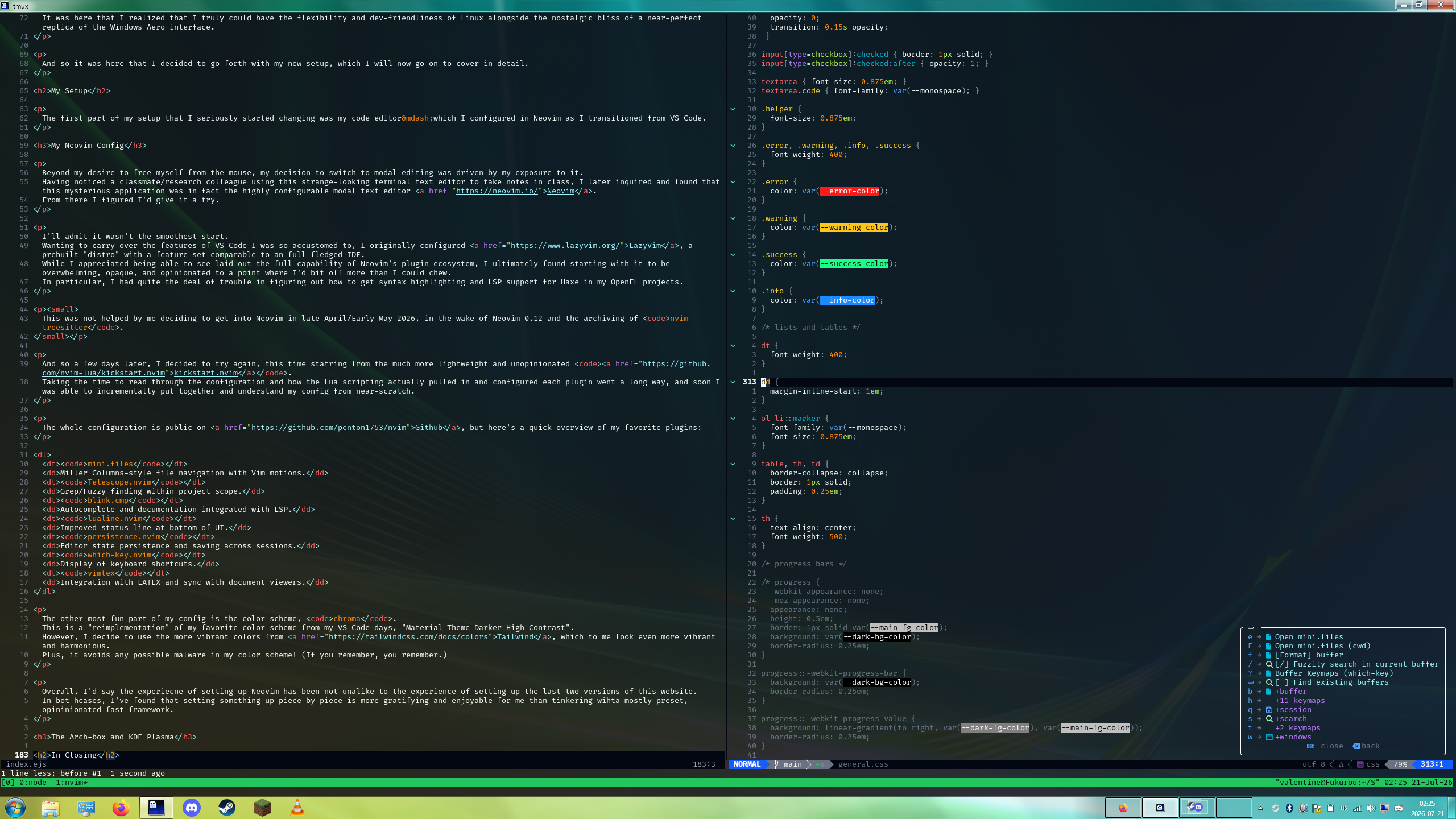
The first part of my setup that I seriously started changing was my code editor—which I configured in Neovim as I transitioned from VS Code.
My Neovim Config
Beyond my desire to free myself from the mouse, my decision to switch to modal editing was driven by my exposure to it. Having noticed a classmate/research colleague using this strange-looking terminal text editor to take notes in class, I later inquired and found that this mysterious application was in fact the highly configurable modal text editor Neovim. From there I figured I'd give it a try.
I'll admit it wasn't the smoothest start. Wanting to carry over the features of VS Code I was so accustomed to, I originally configured LazyVim, a prebuilt "distro" with a feature set comparable to an full-fledged IDE. While I appreciated being able to see laid out the full capability of Neovim's plugin ecosystem, I ultimately found starting with it to be overwhelming, opaque, and opinionated to a point where I'd bit off more than I could chew. In particular, I had quite the deal of trouble in figuring out how to get syntax highlighting and LSP support for Haxe in my OpenFL projects.
This was not helped by me deciding to get into Neovim in late April/Early May 2026, in the wake of Neovim 0.12 and the archiving of nvim-treesitter.
And so a few days later, I decided to try again, this time statring from the much more lightweight and unopinionated kickstart.nvim.
Taking the time to read through the configuration and how the Lua scripting actually pulled in and configured each plugin went a long way, and soon I was able to incrementally put together and understand my config from near-scratch.
The whole configuration is public on Github, but here's a quick overview of my favorite plugins:
mini.files- Miller Columns-style file navigation with Vim motions.
Telescope.nvim- Grep/Fuzzy finding within project scope.
blink.cmp- Autocomplete and documentation integrated with LSP.
lualine.nvim- Improved status line at bottom of UI.
persistence.nvim- Editor state persistence and saving across sessions.
which-key.nvim- Display of keyboard shortcuts.
vimtex- Integration with LATEX and sync with document viewers.
The other most fun part of my config is the color scheme, chroma.
This is a "reimplementation" of my favorite color scheme from my VS Code days, "Material Theme Darker High Contrast".
However, I decide to use the more vibrant colors from Tailwind, which to me look even more vibrant and harmonious.
Plus, it avoids any possible malware in my color scheme! (If you remember, you remember.)
Overall, I'd say the experience of setting up Neovim has been not unalike to the experience of setting up the last two versions of this website. In both cases, I've found that setting something up piece by piece is more gratifying and enjoyable for me than tinkering with a mostly preset, opininionated fast framework.
The Arch-box and KDE Plasma
Having achieved a certain level of comfort in the terminal and growing tired of Windows, I have, as mentioned in the opening of the post, switched my desktop PC to Arch Linux and KDE Plasma. I'm all the more satisfied for it.
I didn't think too much about the choice of distro, to be honest. I knew I didn't want to use anything that was very preconfigured out of the box, and a friend of mine daily drives Arch and had recommended it to me, so that is what I went with. I did (unseriously) consider Gentoo for a bit just for the bragging rights of compiling my own OS, but ultimately I went the way of practicality for my use case and chose Arch.
The actual install went quite smoothly; I did have a couple of oopsies like mounting my /home folder to / and not installing any internet modules while in the liveboot, but for the most part it was all smooth sailing (due in no small part to the wonderful Arch Wiki).
With the OS installed and running, I decided that the next task of course was to set up a desktop environment.
At first I tried the stock KDE Plasma experience, and was able to configure a nice dark mode (using Tailwind colors, of course). Things felt very familiar to my experience in classic Windows, and I was happy with the look and feel. However, my hunger for 2000s nostalgia soon took over, and I spent many hours trying to install AeroThemePlasma onto my machine. This did fail for a few days (specifcially due to the recent release of Plasma 6.7), but eventually I did manage to get a successful install of it and Geckium and was finally able to live out my skeueomorphic fantasies. See below for some beautiful screenshots I took to document the aesthetics.
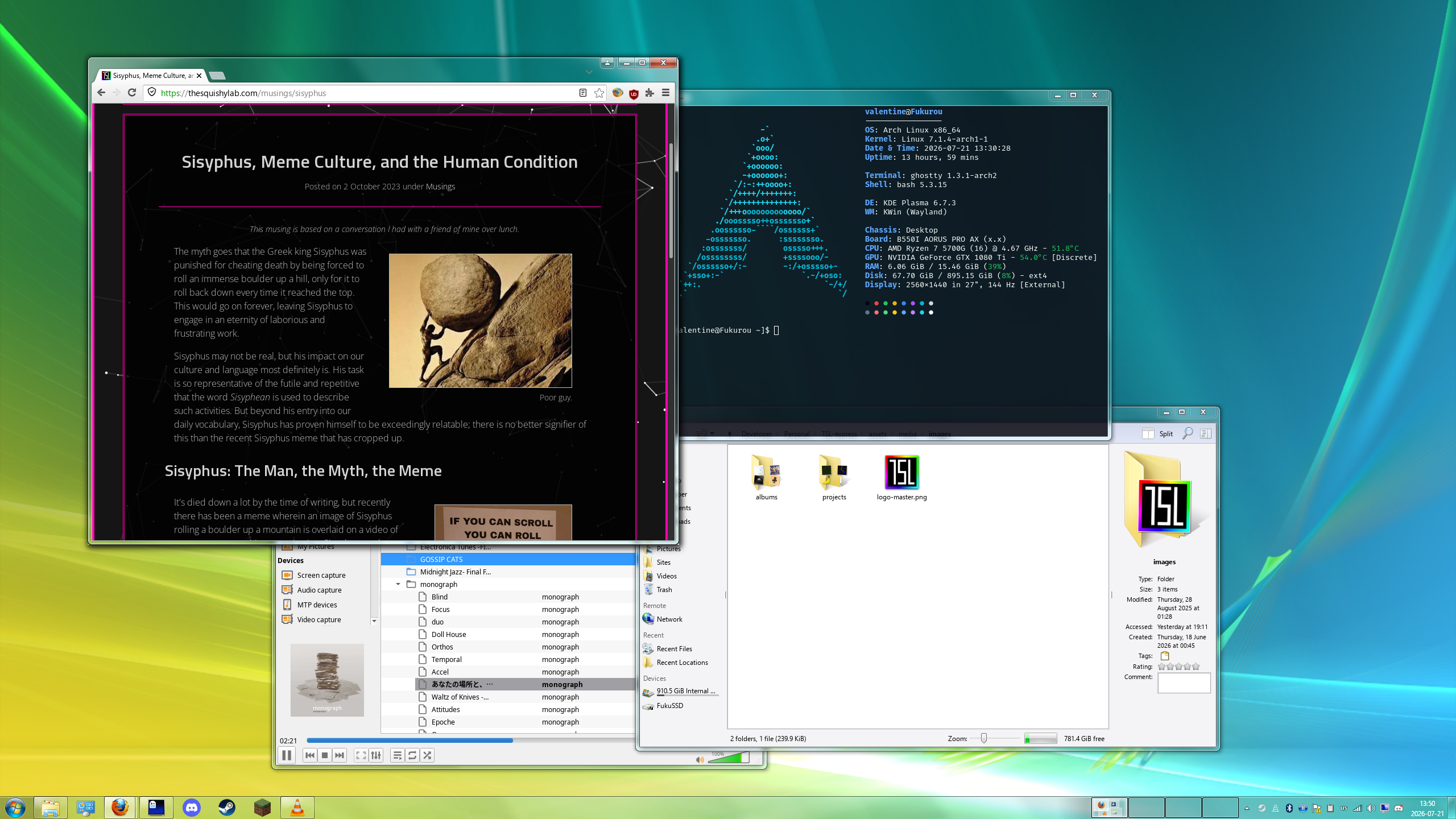
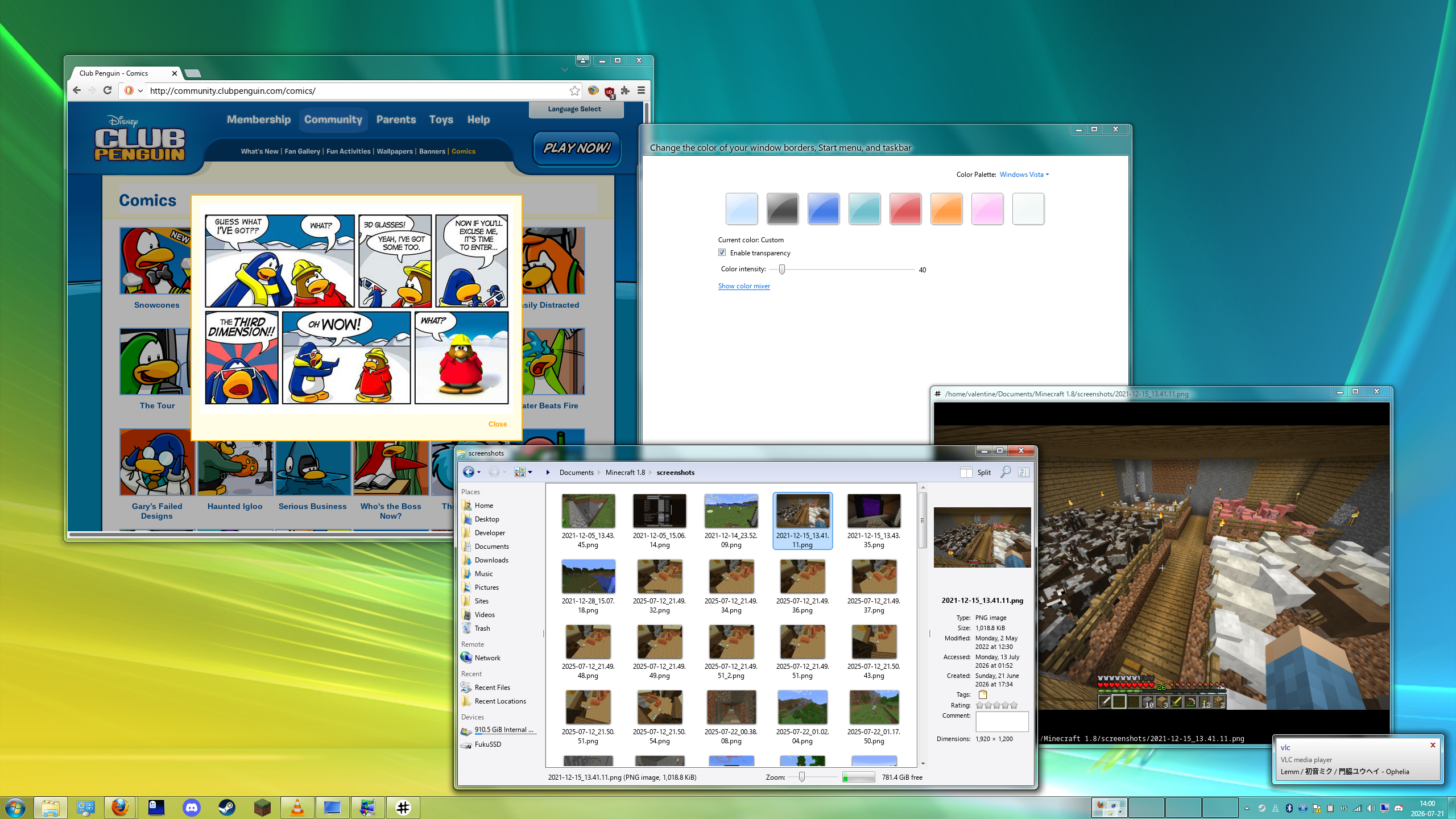
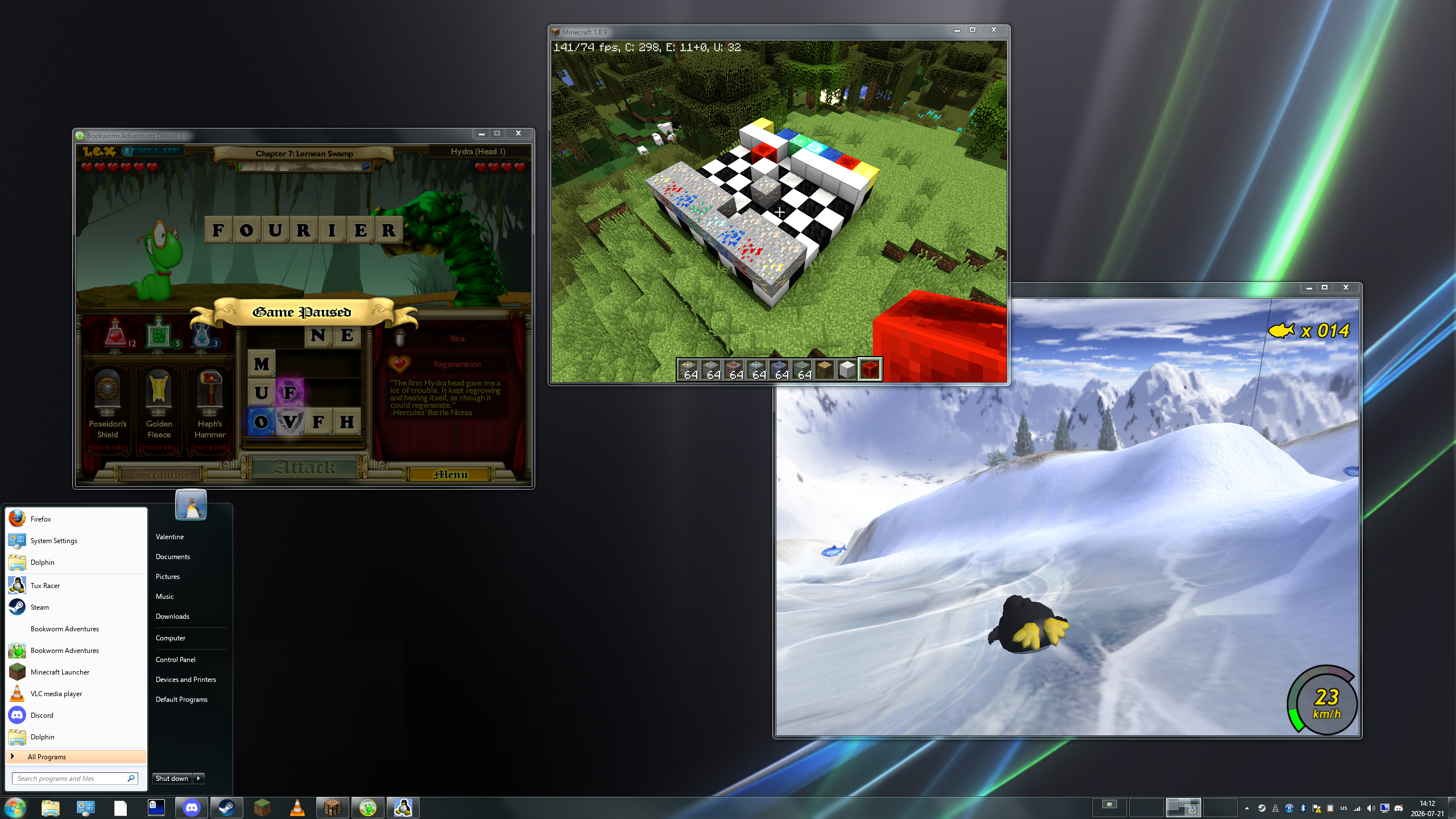
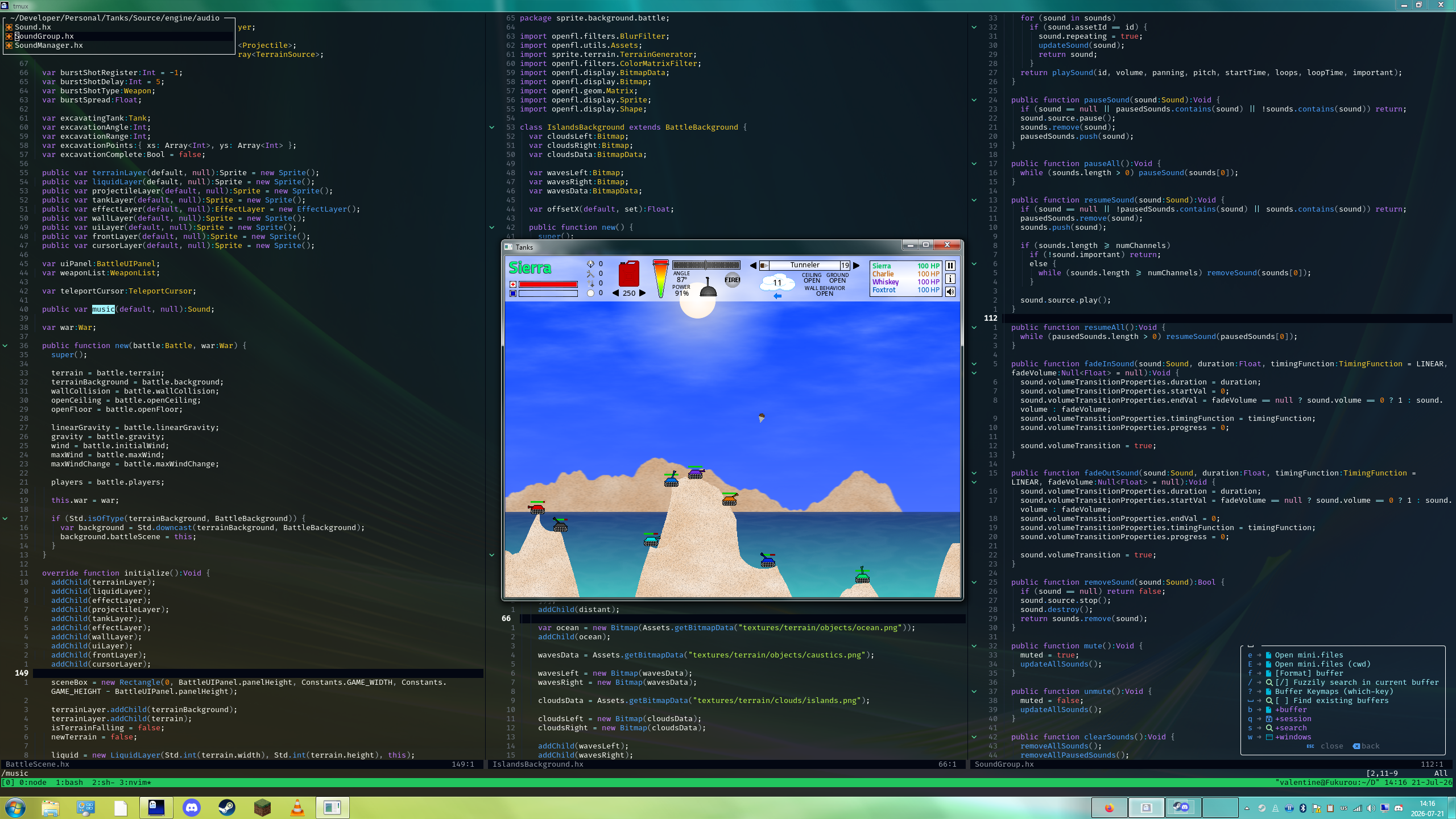
Overall, I'm very happy with the experience.
KDE has a good suite of basic apps (even if I've replaced a few of them with my own preferences) and being able to install, remove, and manage it all through pacman has been an absolute joy.
I love the way the Linux filesystem is set up to be human-friendly even in the depths of config files, and I'm pleased to report that every Steam game I've tested has worked just about flawlessly through Proton.
There's even some extra features that I can't get enough of (yes, I love having my virtual desktops in my taskbar), and I would not be unhappy to daily drive this even on my laptop now.
My list of complaints is very short. Yes, the integration with other hardware is slightly more difficult. Font rendering is ever so slightly less clean. I have to recompile my theme every now and then. But, these are things that I knew I was accepting when I decided to run a bleeding-edge Linux system.
I think the biggest loss for me has been MacOS keyboard behavior. As a DVORAK user, I did appreciate Mac's ability to use QWERTY binds for shortcuts involving the Command (⌘) key, something sorely missed on my old Windows and current Linux machines. But what this ponits to even more is the usage of the Command key itself. I very much appreciate that Macs use the Comamnd key in the GUI and the Control key in the terminal. As someone who works extensively in both environments, the difference goes a long was in ensuring one set of shortcuts doesn't pollute the other. Yes, I've tried solutions like Toshy, but I haven't gotten any of them to work so far. Still, with hohw much of an upgrade this is over my last setup, I'll take all the other victories in stride.
In Closing
Before finishing up, I wanted to take a quick moment to write about one particular program that really got me into keyboard-based workflows in the first place, that being Schism Tracker. Schism is an open-source reimplementation of the DOS-era tracker Impulse Tracker, known for its unique keyboard-based "finger feel". Learning to use Schism made me realize that "older" and "alternative" computing experiences could be fun and efficient to use and develop, and without that I'm not sure I would have done any of this. It's been a blast.
If you'd like to know more or have any questions/suggestions/comments on my setup, feel free to reach out! It's fun to post to this site again after so long, and I've got plenty more ideas to write soon, as well as a big update on a work in progress project. Stay tuned!
Log in to comment on posts.
Nothing here yet. Be the first to comment!